
Productivity Analytics for Transparent Teams
Turn work-hour, app, URL, screenshot, and project data into useful productivity visibility.
Understand patterns, not just hours
WHM brings together tracked time, non-productive usage, screenshots, websites, applications, attendance, and project reports so managers can identify bottlenecks and improve planning without micromanaging every update.
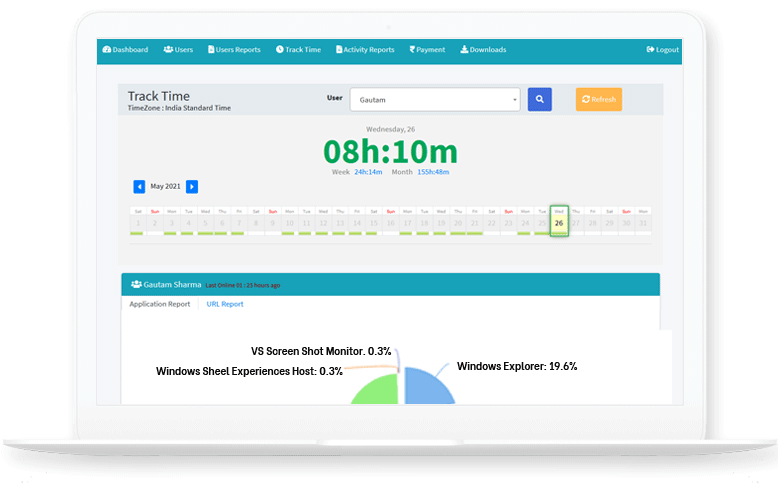
Usage Trends
Review app and website usage with work-hour context.
Activity Context
Use screenshots and activity signals to understand real work progress.
Team Reports
Compare attendance, project time, and custom reports across users.
Productivity analytics that explain the workday
WHM turns raw tracking data into practical visibility for managers. Time totals show how long people worked, while screenshots, applications, websites, attendance, offline time, and project reports explain what happened during those hours.
Signals WHM brings together
- Tracked work hours across day, week, and month views.
- Application and website usage during work sessions.
- Screenshot timelines for transparent work proof.
- Project hours, attendance, offline time, and custom reports.
Business outcomes
- Reduce wasted time by identifying recurring non-productive patterns.
- Improve project planning with real work-hour data.
- Coach teams using context instead of assumptions.
- Give owners clearer daily and monthly operational visibility.
Productivity Analytics FAQs
What productivity data does WHM combine?
WHM combines time totals, screenshots, app usage, website usage, attendance, offline time, and project reports.
Is WHM a productivity score tool?
WHM currently provides productivity visibility through reports and dashboards. A formal productivity score is listed for Phase 2 planning.
Who uses productivity analytics in WHM?
Managers, team leads, agencies, BPOs, remote teams, and small businesses can use WHM analytics for planning, coaching, and accountability.