
WHM in Mobile
Complete mobile workforce management on iOS & Android
Complete Work Visibility & Field Tracking On Mobile
The WHM Mobile App empowers managers and employees with Location History Tracking, User Reports, Application & URL Activity Breakdown, Leave Requests, and Team Directories straight from your smartphone.
GPS
Route TrackingCharts
App/URL BreakdownLive
Team Directory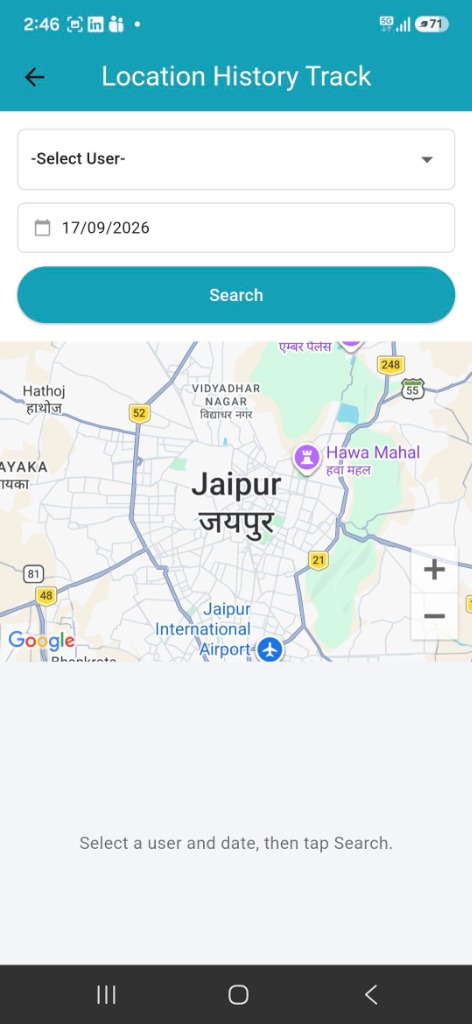
Everything You Need In One Mobile App
Designed specifically to give employees and managers total control on the move.
Location History Track
Select any employee and date to view an interactive map of verified GPS location history and movement routes.
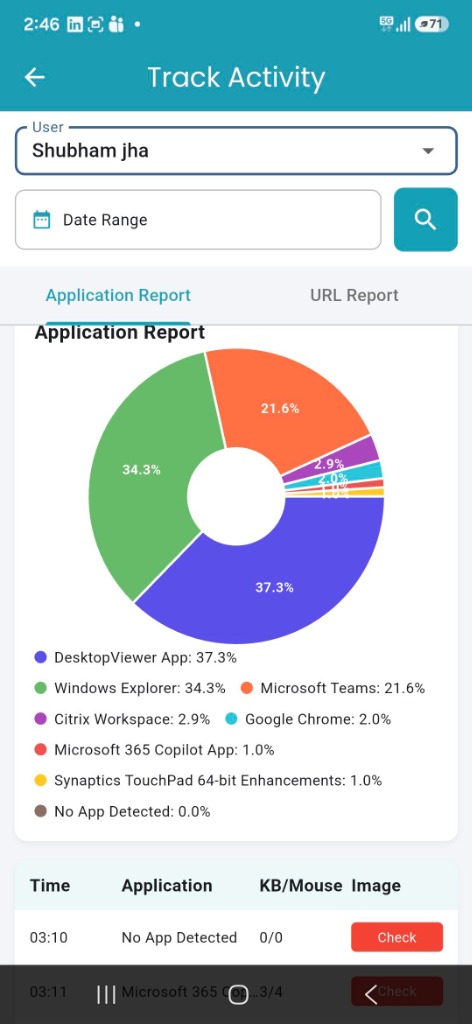
Track Activity Analytics
Interactive pie charts showing exact software, application, and web URL time breakdown for team members.
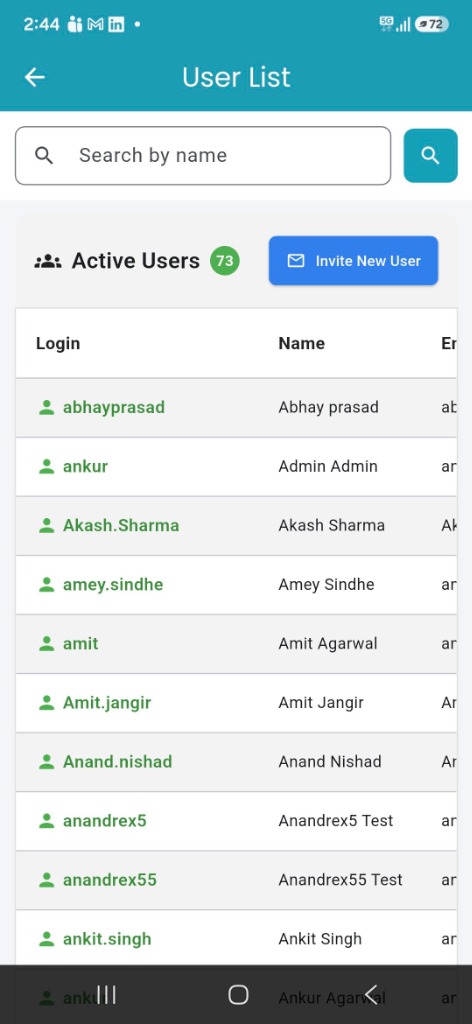
User List & Directory
View live active user counts, search team members by name, and send new user invitations on the fly.
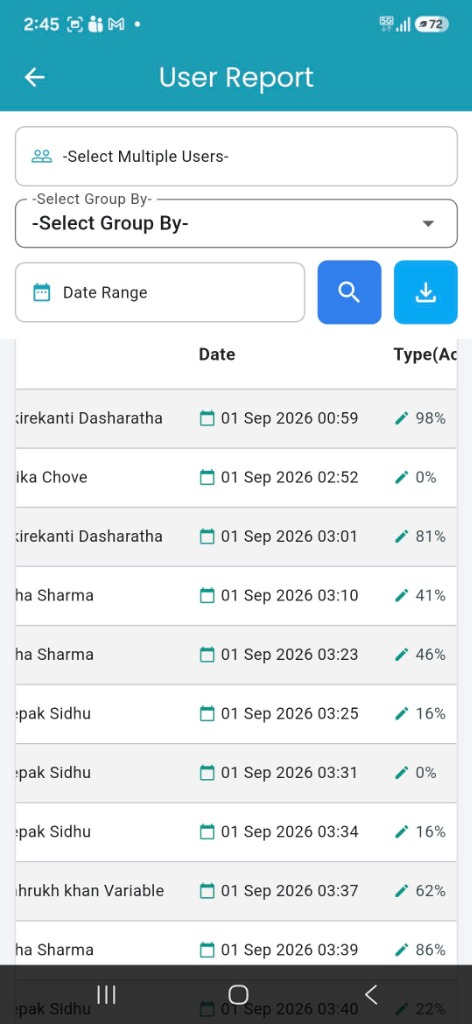
User Reports & Exports
Filter activity by multiple users, custom date ranges, and group-by rules with instant PDF/Excel export.
Leave Requests & Approvals
Submit leave requests, choose leave types, and review approval history with reasons and date ranges.
Mobile Check-In / Check-Out
One-tap daily attendance recording with live work-duration timer and instant web dashboard sync.
WHM in Mobile
Take a closer look at the actual mobile interface designed for intuitive navigation.
1. Location History Track
Easily track field team movement and client site visits on an interactive Google Map. Select any employee, pick a specific date, and tap Search to view verified location routes.
- Employee-wise location history selection
- Date picker for historical location audits
- Integrated Google Maps view with zoom controls
- Verified coordinates for field team accountability
2. Track Activity (Application & URL Report)
Gain deep visual analytics into software usage. View interactive pie charts breaking down exact time spent on applications (e.g. Teams, Chrome, DesktopViewer) and web URLs.
- Interactive donut pie chart percentage breakdown
- Toggle between Application Report and URL Report
- Granular breakdown of active time, KB/Mouse usage
- Direct image/screenshot verification logs
3. User List & Active Directory
Manage your entire workforce from your phone. View live active user badges, search employees by name, inspect user credentials, and invite new members instantly.
- Live active users counter badge (e.g., 73 Active Users)
- Instant "Search by Name" filter
- One-tap "Invite New User" button
- Clean employee list showing username, login name, and email
4. User Activity Reports & Downloads
Inspect detailed attendance logs and activity percentages. Select multiple team members, apply custom date ranges, group by parameters, and export report files.
- Multi-user selection and Group-By filters
- Date range selection for daily, weekly, or monthly logs
- Real-time activity percentage indicators (e.g. 98%, 81%, 62%)
- One-tap report download button
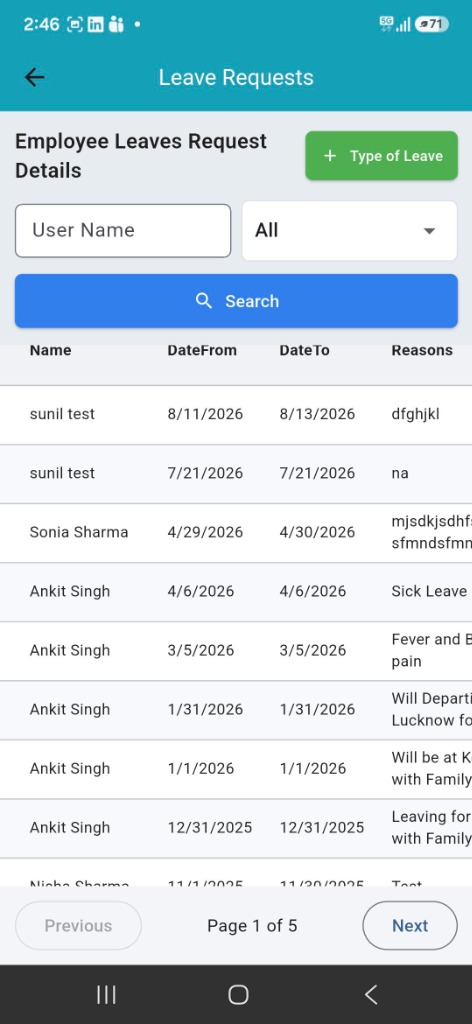
5. Leave Requests & Management
Streamline leave administration on mobile. Employees can apply for leaves while managers inspect pending requests, date ranges, reasons, and leave history.
- One-tap "+ Type of Leave" submission button
- Search by employee name or filter by status
- Detailed view of Date From, Date To, and Reasons
- Smooth pagination controls for historical records
Built for Teams on the Move
See how different roles leverage WHM Mobile to maintain total work visibility.
Field Sales & Service Teams
Field reps can check in at customer sites, log client visits, and maintain verified location trails throughout their shift.
Remote & Hybrid Workforce
Remote workers check in instantly without needing desktop access, keeping their daily attendance and work hours logged accurately.
Construction & Site Inspectors
On-site engineers and inspectors submit attendance and offline time logs straight from job sites without administrative delay.
Managers & HR Approvers
Supervisors review team attendance, approve leave requests, and inspect project hours while travelling or away from desk.
Frequently Asked Questions
Find answers to common questions about WHM in Mobile.